
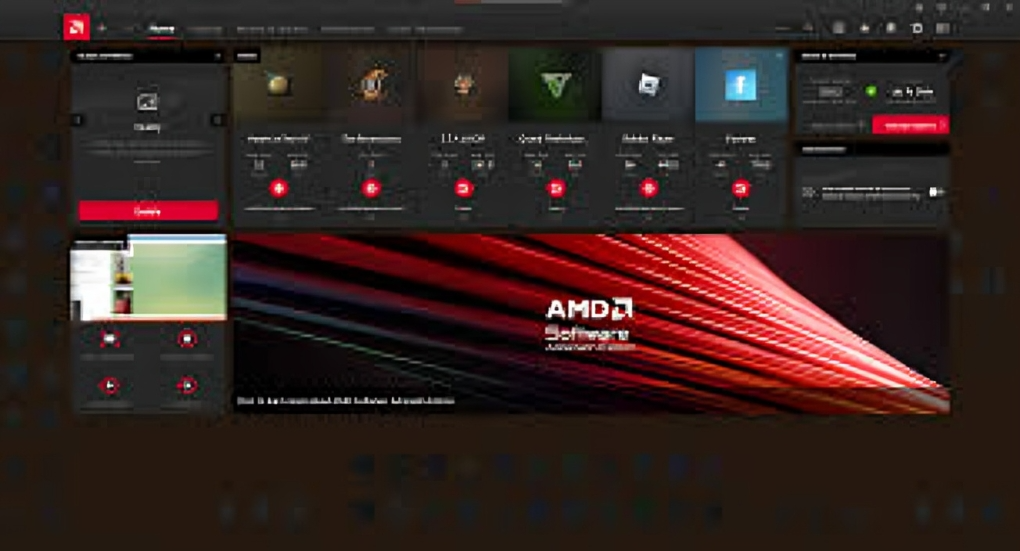
AMD Adrenalin, officially known as AMD Software Adrenalin Edition, serves as the complete companion application for AMD Radeon graphics cards. It delivers an intuitive interface that simplifies driver updates, performance monitoring, and gaming optimizations for everyday users. Whether you build entry-level systems or high-end rigs, AMD Adrenalin unlocks the full potential of your hardware through regular enhancements and user-friendly tools. This software stands out by combining reliability with innovative features that keep pace with modern computing demands. By choosing AMD Adrenalin, you gain seamless access to the latest technologies without complex setups.
The Evolution of AMD Adrenalin
AMD Adrenalin first launched in 2017 as a major refresh to earlier Radeon Software packages, introducing fresh elements like the in-game Radeon Overlay and mobile connectivity via AMD Link. It has since grown into a sophisticated platform that integrates advanced upscaling and AI capabilities while maintaining strong compatibility across Radeon generations. Today, versions such as 26.3.1 continue this legacy with support for new titles and hardware like the RX 9000 series. AMD Adrenalin reflects ongoing commitment to blending hardware power with smart software that evolves alongside user needs. This progression ensures long-term value for anyone relying on AMD graphics.
Installing and Updating AMD Adrenalin
Setting up AMD Adrenalin begins with a quick visit to the official AMD drivers page where the auto-detect tool recommends the right package for your system. The process offers express installation for simplicity or custom options that include the latest AI Bundle on supported hardware. After installation, AMD Adrenalin automatically scans for updates to maintain optimal driver performance and game compatibility. It is wise to remove older graphics software beforehand to prevent conflicts during the transition. Regular updates through AMD Adrenalin keep your setup current with minimal effort and maximum stability.
Key Features of AMD Adrenalin
AMD Adrenalin provides a clean dashboard for quick access to game libraries, performance stats, and driver management in one place. Core tools include Radeon Anti-Lag for reduced input delay, Radeon Chill for efficient power use, and image sharpening for crisper visuals during play. The software now features built-in AMD Chat for local AI assistance with image generation capabilities. Recent driver releases add FSR 4.1 upscaling tailored for newer Radeon cards, delivering noticeable frame rate gains. These elements combine to create a versatile experience that caters to both casual users and enthusiasts seeking fine control.
Gaming Performance Enhancements with AMD Adrenalin
Gamers benefit from AMD Adrenalin through dedicated profiles that optimize settings for individual titles and deliver smoother gameplay across various resolutions. Technologies like Radeon Boost dynamically adjust quality during intense moments while HYPR-RX combines multiple features for overall performance lifts. Recent updates ensure strong support for releases such as Crimson Desert and DEATH STRANDING 2: ON THE BEACH. AMD Adrenalin also monitors frame rates and system metrics in real time without leaving the game. This focus on responsiveness and efficiency makes AMD Adrenalin a reliable choice for anyone who values fluid, immersive gaming sessions.
AI Integration and Future-Proofing in AMD Adrenalin
Recent AMD Adrenalin updates emphasize artificial intelligence with an optional AI Bundle that simplifies local setup for tools like PyTorch, ComfyUI, and Ollama on compatible systems. This addition supports creative workflows and development tasks directly through Radeon hardware. AMD Chat offers convenient on-device AI interaction while Ryzen AI processor support expands versatility for laptops and desktops. As graphics technology advances, AMD Adrenalin maintains forward compatibility with emerging standards and hardware. These AI-focused improvements position the software as a forward-thinking solution that grows alongside user interests in both gaming and content creation. (91 words)
Performance Tuning and Monitoring Tools AMD Adrenalin excels with WattMan for precise overclocking, voltage control, and fan curve adjustments that suit different workloads. Real-time overlays display GPU temperatures, clock speeds, and utilization metrics during sessions for immediate insights. Preset profiles simplify tuning for beginners while advanced users enjoy granular customization options. Regular updates address stability issues and boost efficiency across Radeon RX series cards. AMD Adrenalin empowers users to balance performance, heat, and power consumption effectively. This level of control helps maintain system health and extend hardware longevity without requiring separate monitoring applications.
Recording, Streaming, and Content Creation
AMD Adrenalin includes robust ReLive tools that let you capture gameplay, create instant replays, or stream to popular platforms with low overhead. Customizable overlays, audio mixing, and desktop recording options provide flexibility for tutorials, highlights, or live broadcasts. The software integrates smoothly without demanding extra hardware investments. Users appreciate the minimal performance impact even during high-resolution captures. AMD Adrenalin makes sharing experiences straightforward and professional-grade for creators at any level. These capabilities turn your gaming rig into a complete content production station.
FAQs
What exactly is AMD Adrenalin and who should use it?
AMD Adrenalin is the official software suite for AMD Radeon graphics cards that handles drivers, performance tuning, gaming features, and more through a simple interface. It suits anyone with an AMD GPU, from casual gamers seeking easier updates to enthusiasts wanting advanced controls. The application keeps hardware running smoothly with minimal technical knowledge required.
How do I install or update AMD Adrenalin safely?
Download the latest package from the AMD website using the auto-detect tool, then follow the on-screen prompts for express or custom installation. Always uninstall previous graphics drivers first and restart your system afterward. AMD Adrenalin will handle future updates automatically through its built-in notification system.
Does AMD Adrenalin improve gaming performance noticeably?
Yes, features like FSR upscaling, Anti-Lag, and Chill can deliver higher frame rates, lower latency, and better efficiency depending on your hardware and game settings. Many users report smoother gameplay and reduced stuttering after proper configuration. Results vary by title and system but are generally positive.
Is AMD Adrenalin compatible with older Radeon cards?
Most features work across recent Radeon RX series cards, though newer AI tools and advanced upscaling may require specific models like the RX 7000 or 9000 series. Check release notes for your GPU to confirm supported capabilities before updating.
What are the newest additions to AMD Adrenalin in 2026?
Current versions include FSR 4.1 support, the optional AI Bundle for local tools, and expanded game compatibility with titles like Crimson Desert. AI Chat and improved Ryzen processor integration add modern functionality for both gaming and creative tasks.
Fazit
AMD Adrenalin remains an essential tool for Radeon users seeking reliable performance, easy updates, and innovative features in one package. From its early days to the current AI-enhanced editions, the software consistently delivers value through gaming optimizations, monitoring tools, and creative capabilities. By keeping AMD Adrenalin current, you ensure compatibility with new games, hardware, and technologies while enjoying a streamlined experience. Whether focused on competitive play or content creation, this application empowers everyday users to maximize their AMD graphics investment. Its balanced approach to power and simplicity makes it a standout choice for general PC enthusiasts in 2026 and beyond.